
Hacking Smart Vending Machines: From Weak Password to RCE


Research by GodSec (0x1622, 0x3024 & 0x4r35).
Recently, we were engaged to look at [Redacted], an Indian smart vending machine startup. What started out as a pretty standard web application pentest ended up giving us interactive root shells on the physical Raspberry Pi hardware inside their machines across the country (300+ machines in total).
This entire compromise was a combination of a weak password, OSINT on code that was publicly available on GitHub, and ultimately taking over every machine.
We will start from the start
The first thing we did was to map out all the subdomains related to Redacted.in. At the beginning we only had https://Redacted.in/ as the main domain.
Further using tools like subfinder and assetfinder we were able to identify a total of 7 subdomains:
https://ops-panel.vending-corp.local
https://www.vending-corp.local
https://admin.vending-corp.local
https://api.vending-corp.local
https://vending-corp.local
https://help.vending-corp.local
https://mail.vending-corp.local
There was nothing very special on most of the subdomains except the first one, https://ops-panel.vending-corp.local. The rest of the subdomains were either dead or were not very interesting.
The hint for credentials on Taskdashboard
We started by mapping out their external footprint. During subdomain enumeration we found ops-panel.vending-corp.local; it was a Next.js app used by their internal operations team.
While going through the minified JavaScript bundle for the frontend, we noticed how they were handling role-based access control (RBAC):
// Admin check is client-side only:
let s = o === 'role_012' || o === 'role_010' // full admin
let c = o === 'role_007' // limited access
So basically role_012 and role_010 had full access.
Since the check was happening entirely on the client side, anyone could just edit their localStorage, set their role to role_012, which is super admin, and unlock the whole admin UI. The catch was that we still needed a valid token to actually pull data from the backend.
During this whole process, 0x1622 was doing OSINT as well and found a few valid employee email addresses. We built a targeted wordlist and ran a password spray against the login endpoint.
...
const getAuthToken = async () => {
  const token_api = "https://api-gateway.vending-corp.local/v1/auth/login";
  const user = {
    id: "Redacted@gmail.com",
    password: "employeename1"
  };
  const res = await fetch(token_api, {
    method: "POST",
    headers: { "Content-Type": "application/json" },
    body: JSON.stringify({ user }),
  });
  const data = await res.json();
  return data.data.token;
};
BOOM!
The craziest part comes here: it did not take long to get a hit on an employee account with a weak password, employeename1. If I remember correctly, it just took us 5-10 attempts.
SUCCESS! Password: employeename1
Token: eyJhbGciOiJIUzI1NiIsInR5cCI6IkpXVCJ9.eyJ1c2VyIjoi<REDACTED_JWT_PAYLOAD>.s-G85m7oqWY1Sz8ft3E-1ACStEaXaXCsl66w5rOIwpE
Data: {
  "success": true,
  "message": "Login successful",
  "token": "eyJhbGciOiJIUzI1NiIsInR5cCI6IkpXVCJ9.eyJ1c2VyIjoi<REDACTED_JWT_PAYLOAD>.s-G85m7oqWY1Sz8ft3E-1ACStEaXaXCsl66w5rOIwpE",
  "user": "Redacted@gmail.com"
}
Now we had access to their login dashboard, from which we could view all the important details.
Now that we had a valid JWT token, we started looking at the authenticated endpoints. By analyzing the JavaScript files again, we found a couple of very interesting endpoints that we wanted to test.
We hit /v1/workgroups, expecting it to return the profile details for our specific team. Again the fun part: instead of a specific team, it dumped the entire employee database.
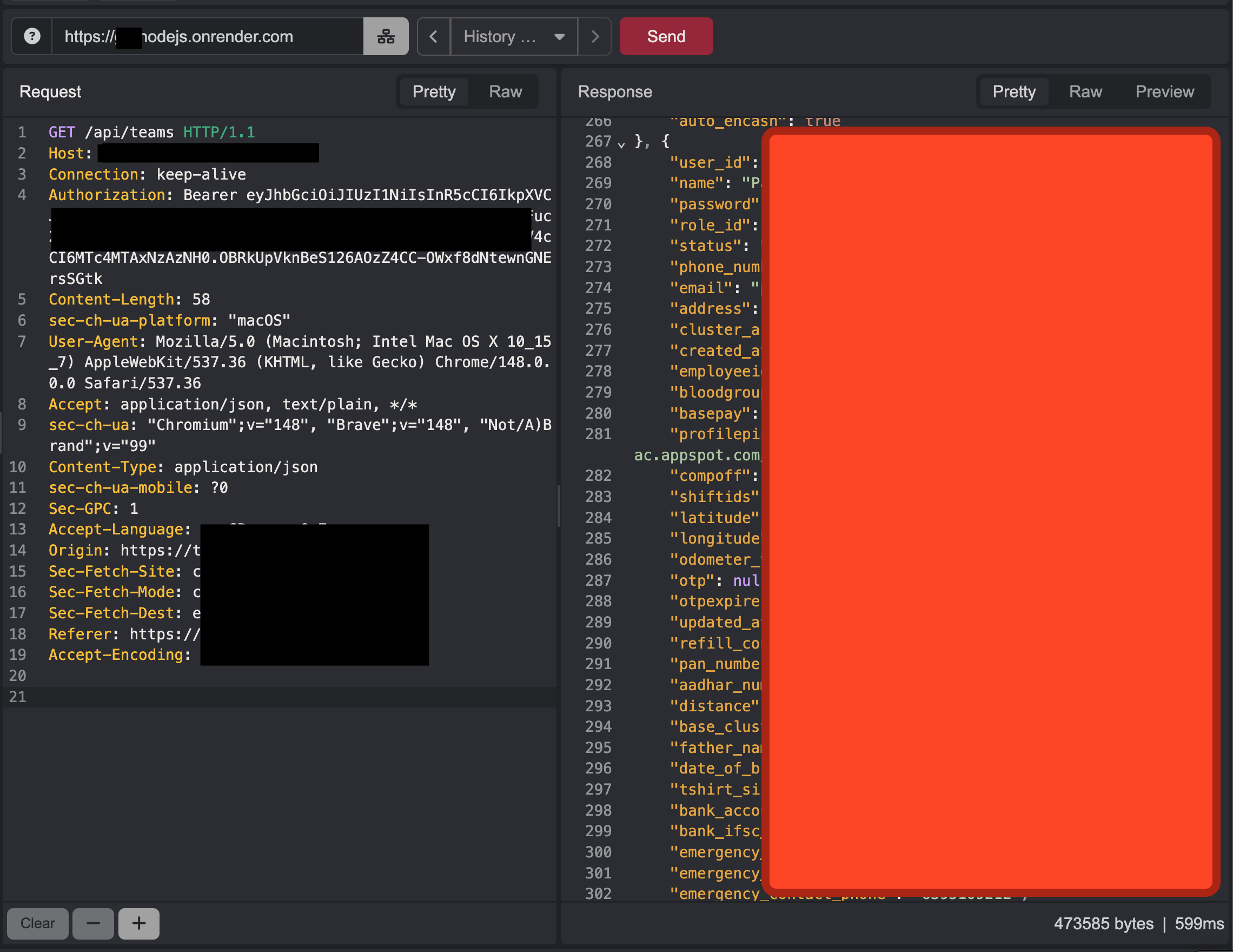
This was a massive authorization flaw. The response included 284 employee records. Worse, it included every single employee's password in plaintext. It also leaked Aadhaar and PAN numbers, bank account details, Google Cloud Storage links to photos, and their physical ID cards.
Since we had the plaintext passwords for everyone, we just pulled out the 14 super admin role_012 accounts and effectively had control over the platform at that point.
Inside the dashboard
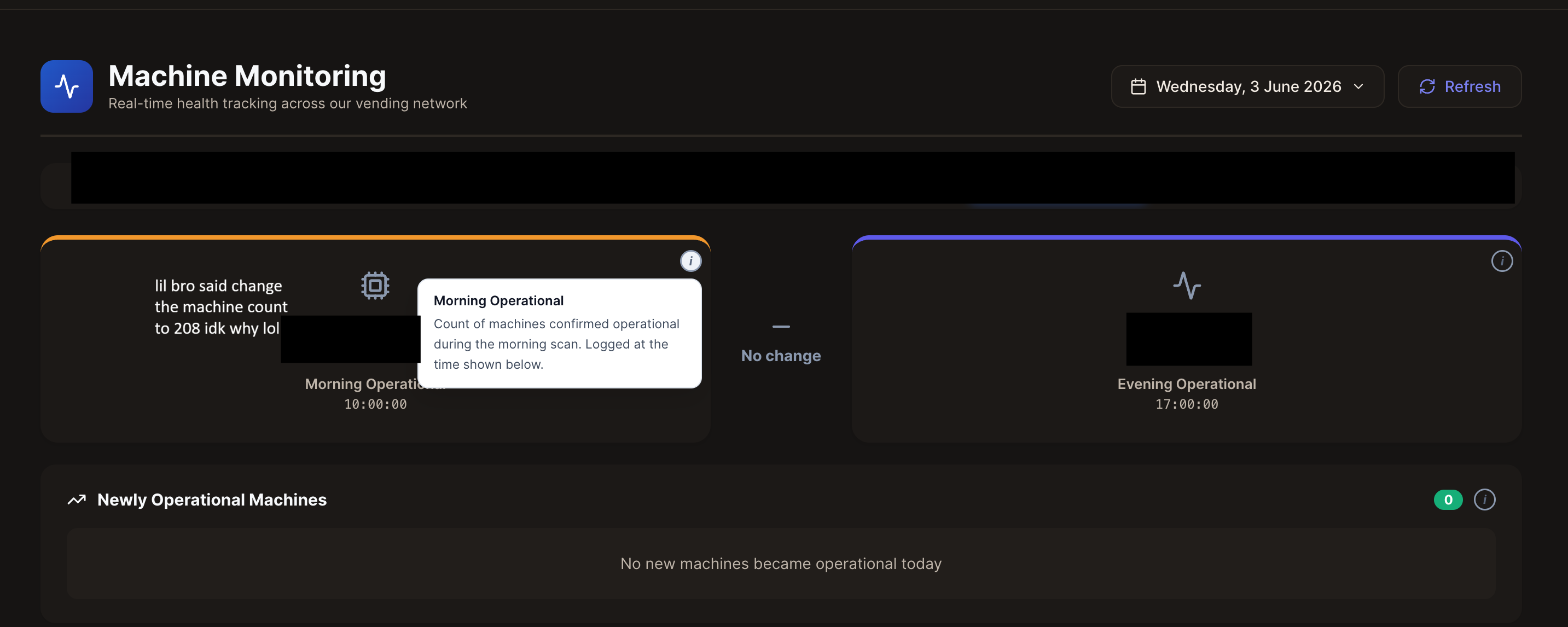
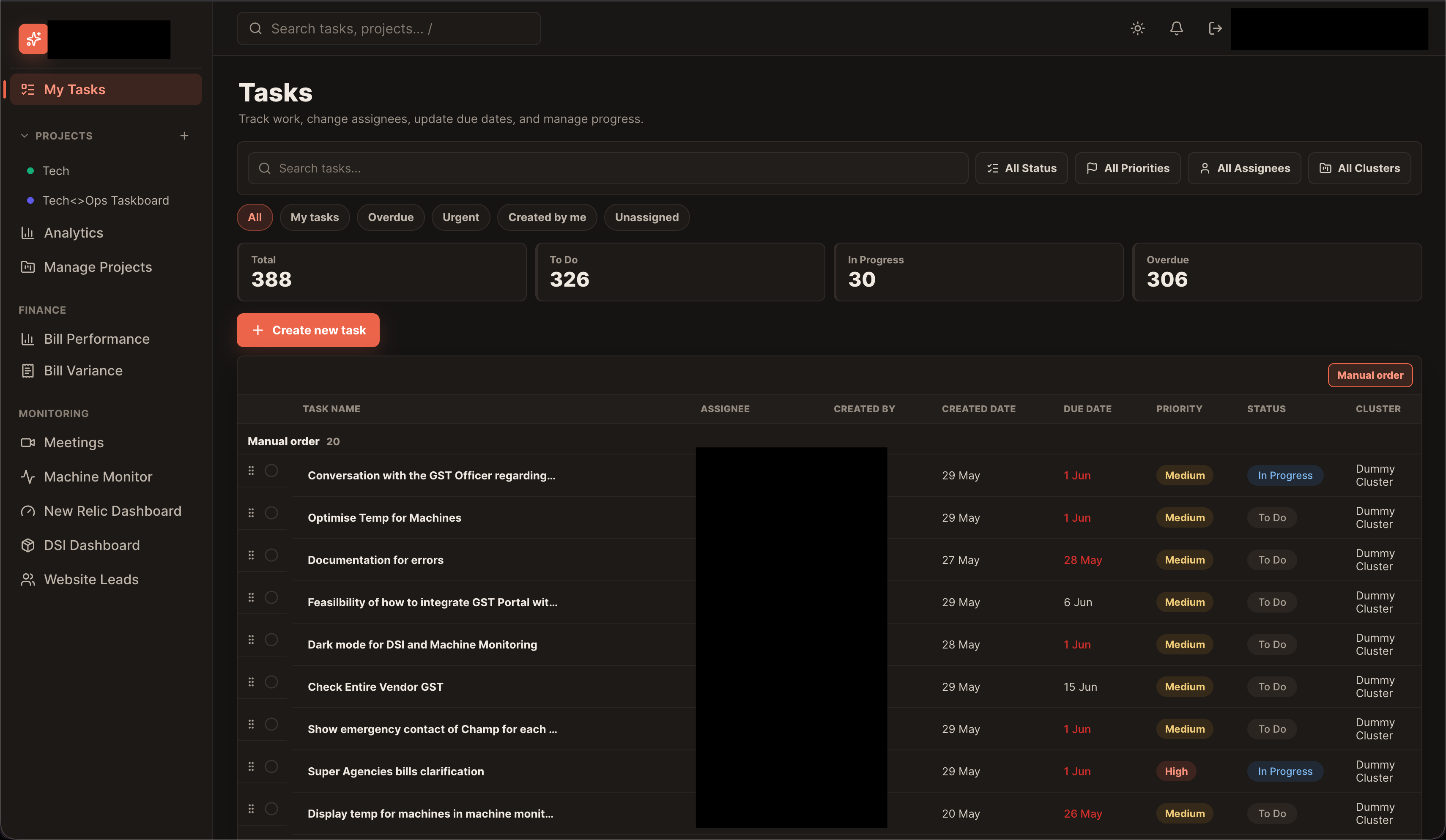
Logging in as a super admin gave us access to everything. We could view live fleet monitoring, task management, and the DSI dashboard, which showed raw sales data, profit margins, and inventory stats.
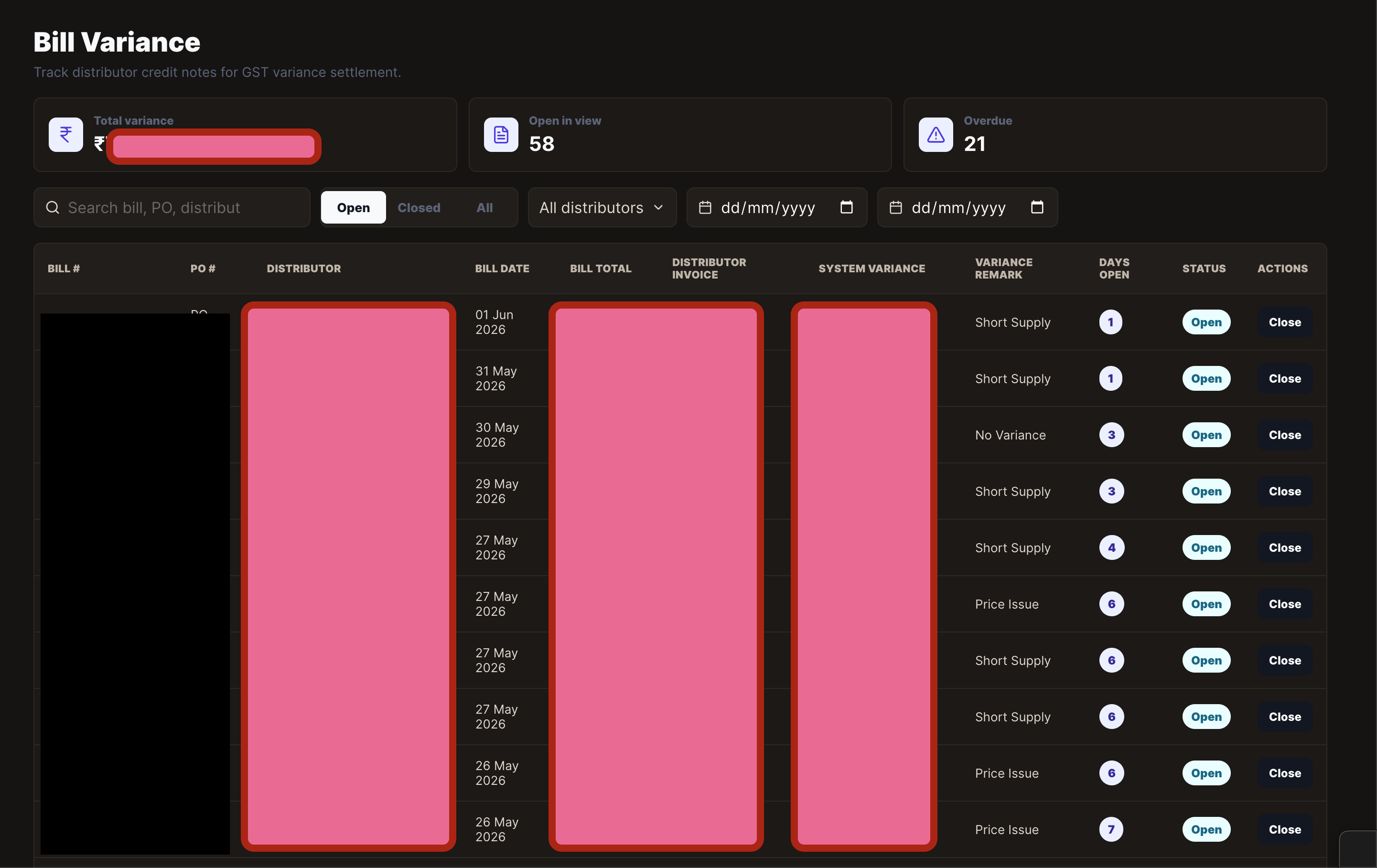
There was a huge amount of data available in this dashboard. For example, we could see the live order count, the total number of transactions from the past 30 days, total profits, and waste products.
At this stage, we analyzed the application's authentication flow. The image below shows how authentication was handled within the platform. Additionally, we identified that the application's backend was hosted at https://api-gateway.vending-corp.local, which served as the primary API endpoint for the entire system.
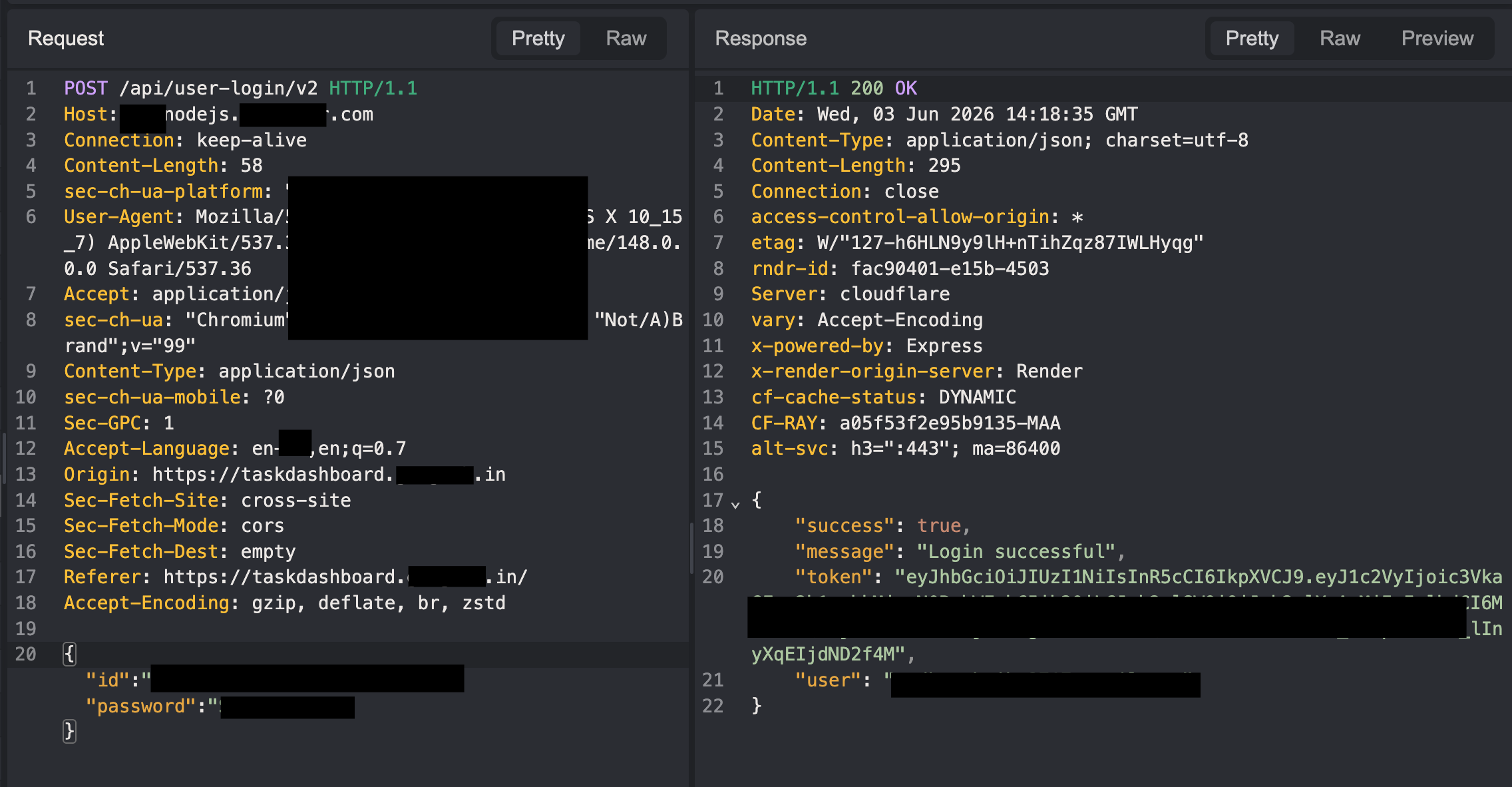
The login functionality used the /v1/auth/login endpoint to authenticate users.
At this point we had enough data to report, but we still thought it was not that critical of a bug. Unless and until we got something crazier, we were not going to stop.
This part was the most challenging. At that stage, we had no clear direction for further pivoting from the application. We knew about the API server at https://api.vending-corp.local/, but without knowledge of the available endpoints, targeting it effectively was difficult.
We attempted to discover endpoints through fuzzing, but those efforts did not yield any useful results. Without additional information about the API structure, further progress on this attack path seemed unlikely.
Though we confirmed that all the endpoints that were working for https://api-gateway.vending-corp.local were also working for https://api.vending-corp.local/.
We spent roughly 4-6 hours exploring different attack paths, but none of them led anywhere significant. Then, almost by chance, 0x1622 discovered what turned out to be a goldmine: a publicly accessible GitHub repository.
// require('./utils/newRelicAPIMonitoring.js')
// import 'newrelic';
// let newrelic = null;
// try {
//     newrelic = require('newrelic');
// } catch (e) {
//     console.warn('New Relic not loaded:', e.message);
// }

const cluster = require('cluster');
const os = require('os');
const express = require('express');
// const ping = require('ping');
const bodyParser = require('body-parser');
const timeout = require('connect-timeout');
require('dotenv').config();
const cors = require('cors');


const path = require('path');


const logger = require('./middlewares/logger');
const errorHandler = require('./middlewares/errorHandler');
const authenticate = require('./middlewares/authenticate');

// const hardwareRoutes = require('./routes/hardwareRoutes')
// const temperatureRoutes = require('./routes/temperatureRoutes')
// const distributorRequestRoutes = require('./routes/distributorRequestRoutes')

// async function queryWithMetrics(text, params, req) {
//     const start = Date.now();
//     const clientIp = req ? (req.headers['x-forwarded-for'] || req.socket.remoteAddress) : 'Unknown';

//     try {
//         const res = await pool.query(text, params);
//         const duration = Date.now() - start;
//         newrelic.recordMetric('Custom/DBQuery', duration);
//         newrelic.recordCustomEvent('DatabaseQuery', {
//             query: text,
//             executionTime: duration,
//             clientIp: clientIp
//         });
//         return res;
//     } catch (error) {
//         newrelic.noticeError(error);
//         throw error;
//     }
// }


const numCPUs = os.cpus().length;

if (cluster.isMaster) {
    console.log(`Master process ${process.pid} is running`);
    require('newrelic');

    // Fork workers
    for (let i = 0; i < numCPUs; i++) {
        cluster.fork();
    }

    // Listen for worker exit

    cluster.on('exit', async (worker, code, signal) => {
        // const publicIp = await getPublicIP();
        console.log(`Worker ${worker.process.pid} exited. Restarting...`);

        // newrelic.recordCustomEvent('WorkerExit', {
        //     workerId: worker.process.pid,
        //     exitCode: code,
        //     signal: signal,
        //     // serverIp: publicIp
        // });
        cluster.fork();
    });

    // require('./cronJobs/alertTriggerCron.js')

    // require('./cronJobs/cronForMaps.js');
    // require('./cronJobs/cronForRefilingHours.js');
    // require('./cronJobs/poSummaryCron.js')
    // require('./cronJobs/cronForEmailBills.js');
    // require('./cronJobs/cronToEmailBillSumarriesToZOHOUsers.js');
    // require('./cronJobs/cronForSalaryCalcsEveryMonth.js')
    // const attendanceCron = require('./cronJobs/attendanceCronJob.js');
    // attendanceCron.scheduleCronJob();
    // require('./cronJobs/cronForProductScores.js')
    // require('./cronJobs/orderingModel.js');
    // require('./cronJobs/cronJobForAvailabilityStatus');
    // require('./cronJobs/cronForWarehouseInventoryToNR.js');
    // require('./cronJobs/cronForAvgSalesClusterAndProduct.js');
    // require('./cronJobs/cronForPOautoCancellation.js');
    // require('./cronJobs/cronForUsersPointsCalculation.js');
    // require('./cronJobs/autoEncash.js');
    // require('./new Relic/attendance_newRelic.js');
    // require('./new Relic/clusterWiseAttendance.js');
    // require('./new Relic/lastAttendance.js')
    // require('./cronJobs/refillCountResetCron.js');
    // require('./new Relic/todayAttendance.js')
    // require('./cronJobs/toSendBillsAdjustmentToNr.js')
    // // over ride request summary cron job
    // require('./new Relic/override_requests.js')
    // require('./new Relic/workingHours/avg_availability.js');
} else {

    const app = express();
    const port = process.env.PORT || 4000;


    const MAX_CONCURRENT_REQUESTS = 150;
    let currentRequests = 0;
    const requestQueue = [];

    // Middleware to manage concurrent requests
    const concurrencyLimiter = (req, res, next) => {
        if (currentRequests < MAX_CONCURRENT_REQUESTS) {
            currentRequests++;
            res.on('finish', () => {
                currentRequests--;
                if (requestQueue.length > 0) {
                    const nextReq = requestQueue.shift();
                    nextReq();
                }
            });
            next();
        } else {
            console.log(`Queueing request to ${req.method} ${req.originalUrl}`);
            requestQueue.push(() => {
                concurrencyLimiter(req, res, next);
            });
        }
    };

    // Apply the middleware globally
    // app.use(concurrencyLimiter);

    // setInterval(() => {
    //     console.log(`Current active requests: ${currentRequests}`);
    //     console.log(`Requests in queue: ${requestQueue.length}`);
    // }, 5000);


    app.use(timeout('50s'));


    // for emergency use only
    // app.use((req, res, next) => {
    //     // If load is too high, short-circuit with success
    //     if (process.env.ALWAYS_SUCCESS === "true") {
    //         return res.status(200).json({ success: true });
    //     }
    //     next();
    // });


    // Middleware to handle timeouts
    app.use((req, res, next) => {
        if (req.timedout) {
            console.log(`Request to ${req.method} ${req.originalUrl} timed out`);
            activeSockets.delete(req.socket);
            if (!res.headersSent) {
                res.status(503).end('Request timed out');
            }
        } else {
            next();
        }
    });

    app.use((err, req, res, next) => {
        console.error(`Error during request to ${req.method} ${req.originalUrl}:`, err);
        activeSockets.delete(req.socket);
        if (!res.headersSent) {
            res.status(500).json({ error: 'Internal Server Error' });
        }
    });

    app.use(cors());
    // app.use(cors({
    //     origin: "*",
    //     methods: ["GET", "POST", "PUT", "DELETE", "OPTIONS"],
    //     allowedHeaders: ["Content-Type", "Authorization"]
    // }));

    app.use(bodyParser.json());
    app.use(logger);
    // const newrelic = require('newrelic');
    const activeSockets = new Map();

    // Middleware to track incoming requests and associated sockets
    app.use((req, res, next) => {
        const startTime = Date.now();
        const socket = req.socket;
        const endpoint = `${req.method} ${req.originalUrl}`;

        if (!activeSockets.has(socket)) {
            activeSockets.set(socket, endpoint);
        }

        req.on('aborted', () => {
            console.log(`Request to ${endpoint} was aborted by the client`);
            activeSockets.delete(socket);
        });

        req.on('timeout', () => {
            console.log(`Request to ${endpoint} timed out after 30s`);
            activeSockets.delete(socket);
            console.log(`Socket deleted for ${endpoint}`);
            if (!res.headersSent && !res.finished) {
                res.status(503).end();
            }
        });

        res.on('finish', () => {
            const duration = Date.now() - startTime;
            // console.log(`Request to ${endpoint} finished in ${duration}ms`);
            activeSockets.delete(socket);
        });

        res.on('close', () => {
            console.log(`Response closed for ${endpoint}`);
            activeSockets.delete(socket);
        });

        next();
    });

    // api monitoring middleware
    app.use((req, res, next) => {
        const start = Date.now();
        const endpoint = `${req.method} ${req.originalUrl}`;
        const clientIp = req.headers['x-forwarded-for'] || req.socket.remoteAddress;


        // req.on('aborted', () => {
        //     console.log(`Request to ${endpoint} was aborted`);
        // });

        // req.on('timeout', () => {
        //     console.log(`Request to ${endpoint} timed out`);
        //     if (!res.headersSent && !res.finished) {
        //         res.status(503).end('Request timed out');
        //     }
        // });

        // res.on('finish', () => {
        //     const duration = Date.now() - start;
        //     newrelic.recordMetric(`Custom/API/${endpoint}`, duration);
        //     newrelic.recordCustomEvent('APIRequest', {
        //         endpoint: endpoint,
        //         responseTime: duration,
        //         clientIp: clientIp,
        //         statusCode: res.statusCode,
        //     });
        //     console.log(`Request from ${clientIp} to ${endpoint} finished in ${duration}ms`);
        // });

        next();
    });


    // setInterval(() => {
    //     const cpuUsage = os.loadavg()[0]; // 1-minute CPU load
    //     const memoryUsage = process.memoryUsage().rss / 1024 / 1024; // MB

    //     newrelic.recordCustomEvent('CPUUsageEvent', {
    //         cpu: parseFloat(cpuUsage.toFixed(2)),
    //         memory: parseFloat(memoryUsage.toFixed(2))
    //     });

    //     console.log(`CPU: ${cpuUsage}, Memory: ${memoryUsage}MB`);
    // }, 60000);


    // Example: Applying authentication middleware to secure routes
    // app.use('/api/secure', authenticate, secureRoute);

    // Public route
    // app.get('/health', (req, res) => {
    //     res.send('Vending Machine API is running');
    //     // res.send(`Hello from Vending Machine Worker ${process.pid}`);
    // });

    // app.post('/test', (req, res) => {
    //     setTimeout(() => {
    //         res.status(200).send('OK');
    //     }, 2000);
    // });

    // app.use('/api/v1/auth', authRoutes);
    // app.use('/api/v1/workgroups', teamRoutes);
    // app.use('/api/v1/device-telemetry', deviceTelemetryRoutes);
    // app.use('/api/v1/sales', salesRoutes);
    // app.use('/api/v1/inventory', inventoryRoutes);
    // app.use('/api/v1/alerts', alertRoutes);
    // app.use('/api/v1/fleet-management', fleetRoutes);
    // app.use('/api/v1/firmware', firmwareRoutes);
    // app.use('/api/v1/checkout', checkoutRoutes);
    // app.use('/api/v1/maintenance', maintenanceRoutes);
    // app.use('/api/v1/metrics', metricsRoutes);
    // app.use('/api/v1/settings', settingsRoutes);
    // app.use('/api/v1/support', supportRoutes);
    // app.use('/api/v1/reports', reportsRoutes);

    // --- Serve the React App ---
    // IMPORTANT: Define the route where your React app will be served
    const REACT_APP_BASE_ROUTE = '/';

    // Serve static files from the React app's build directory
    app.use(REACT_APP_BASE_ROUTE, express.static(path.join(__dirname, 'Redacted-main-website', 'dist')));

    // For any other GET request that doesn't match an API route or static file
    // within the React app's base route, serve the React app's index.html.
    // This is crucial for React Router to handle client-side routing.
    // app.get(`${REACT_APP_BASE_ROUTE}/*`, (req, res) => {
    //     res.sendFile(path.join(__dirname, 'Redacted-main-website', 'dist', 'index.html'));
    // });


    // app.use(express.static(path.join(__dirname, 'Redacted-main-website', 'dist')));

    // // Fallback route for React Router
    // app.get('*', (req, res) => {
    //     res.sendFile(path.join(__dirname, 'Redacted-main-website', 'dist', 'index.html'));
    // });


    app.listen(port, '0.0.0.0', () => {
        console.log(`Server running on port ${port} with Worker ${process.pid}`);
    });

}
// module.exports = app
The repository appeared to belong to one of the company's developers and contained source code related to the application. Fortunately or unfortunately, it had been left public, exposing a wealth of internal information that was never intended to be accessible to external users.
While reviewing the repository, we discovered Google Cloud service account credentials committed directly to the source code.
{
  "type": "service_account",
  "project_id": "Redacted",
  "private_key_id": "Redacted",
  "private_key": "-----BEGIN PRIVATE KEY-----\nRedacted\n-----END PRIVATE KEY-----\n",
  "client_email": "firebase-adminsdk-ou9x6@Redacted.iam.gserviceaccount.com",
  "client_id": "Redacted",
  "auth_uri": "https://accounts.google.com/o/oauth2/auth",
  "token_uri": "https://oauth2.googleapis.com/token",
  "auth_provider_x509_cert_url": "https://www.googleapis.com/oauth2/v1/certs",
  "client_x509_cert_url": "https://www.googleapis.com/robot/v1/metadata/x509/firebase-adminsdk-<REDACTED_CERT_URL>",
  "universe_domain": "googleapis.com"
}
Even more concerning, the credentials had not been revoked or rotated and were still valid at the time of testing. Depending on the permissions assigned to the service account, this could have provided extensive access to cloud resources associated with the organization.
The hijack of 300+ machines
Returning to the API endpoints, we began systematically testing the various functionalities exposed by the application. During this process, we identified several low- and medium-severity vulnerabilities. However, to keep this write-up focused and concise, I will not be covering those findings in detail.
Instead, I will focus on the issues that ultimately led to the full compromise of the environment.
While testing the available endpoints, we came across a particularly interesting endpoint: /v1/device-telemetry. This endpoint exposed information related to Dataplicity.
- Dataplicity is basically a remote access and management service specifically built for small Linux-based IoT devices.
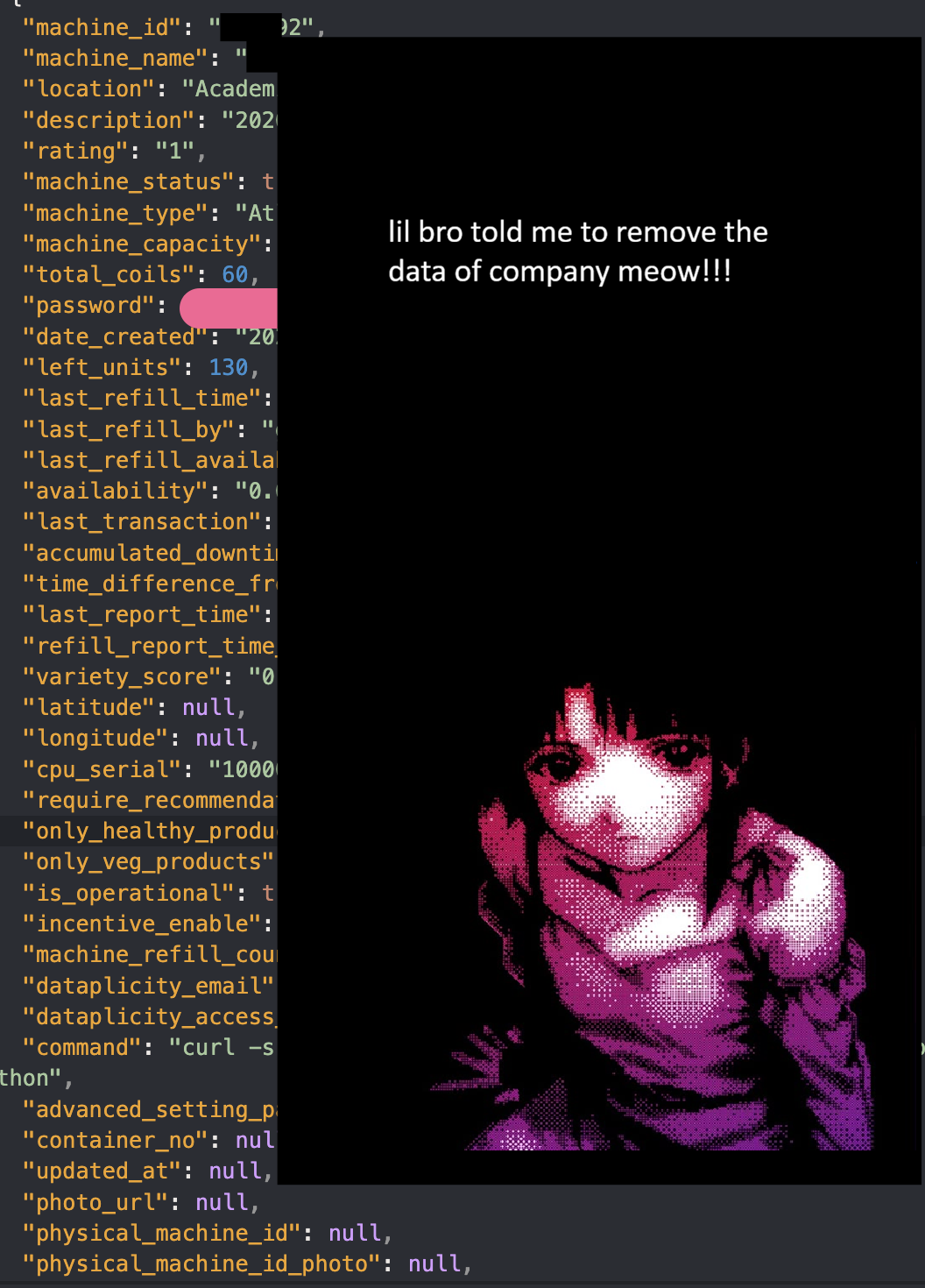
We decided to investigate the exposed data further to determine whether it could be leveraged for additional access or privilege escalation opportunities.
Going Beyond Privileges
Using the credentials exposed by the /v1/device-telemetry endpoint, we attempted to log in to the Dataplicity dashboard. Unsurprisingly, the credentials were valid and granted us access.
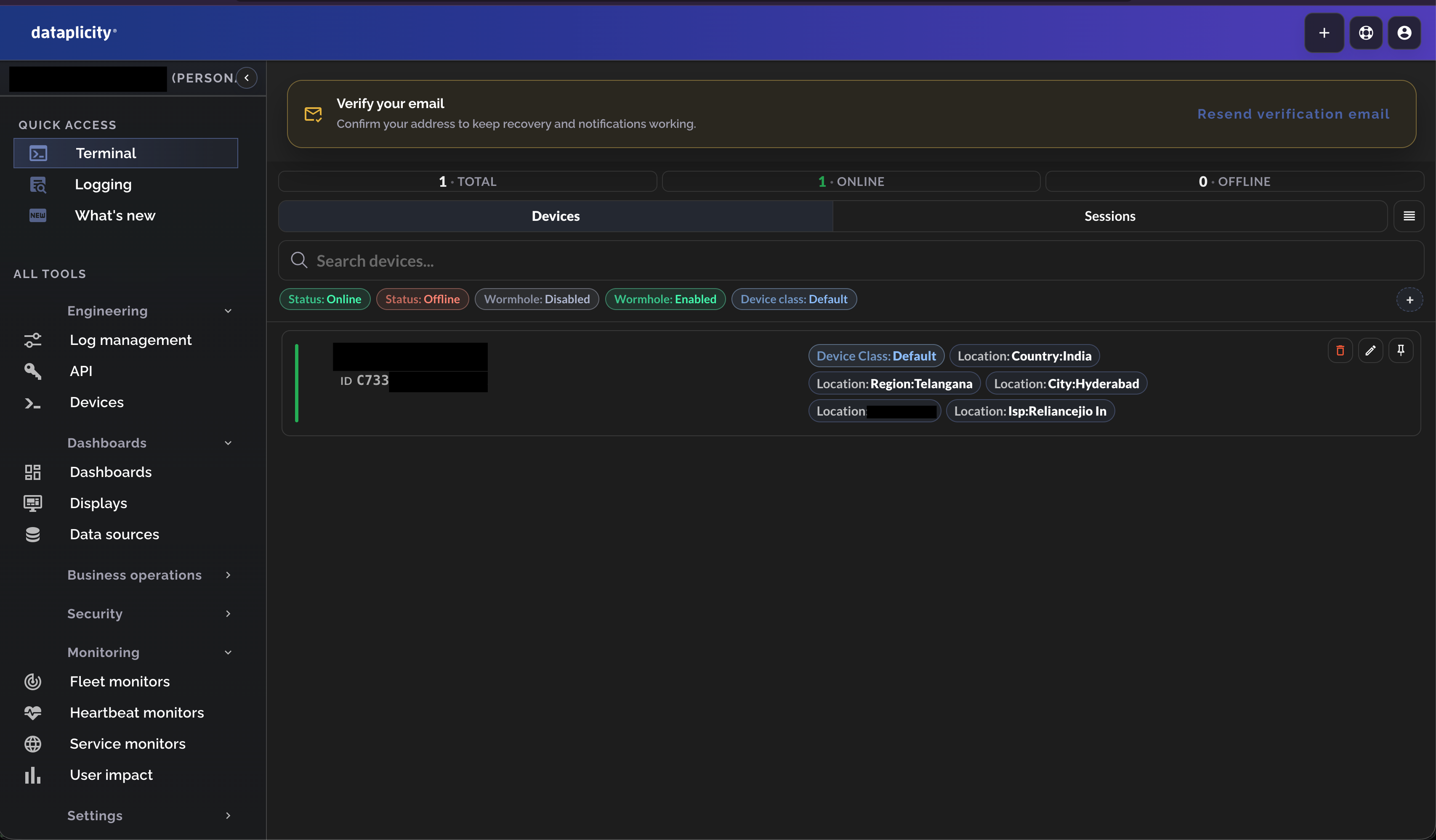
What made this finding particularly severe was that these credentials were not limited to a single device. The endpoint exposed credentials for every machine managed by the organization, more than 300 machines in total.
The Dataplicity interface provided an overview of all registered devices and their current status, indicating whether each machine was online or offline.
Among the available features, the most interesting and impactful was the Terminal functionality. This feature allowed direct shell access to the underlying machine through the web interface, effectively providing remote command execution on any device for which valid credentials were available.
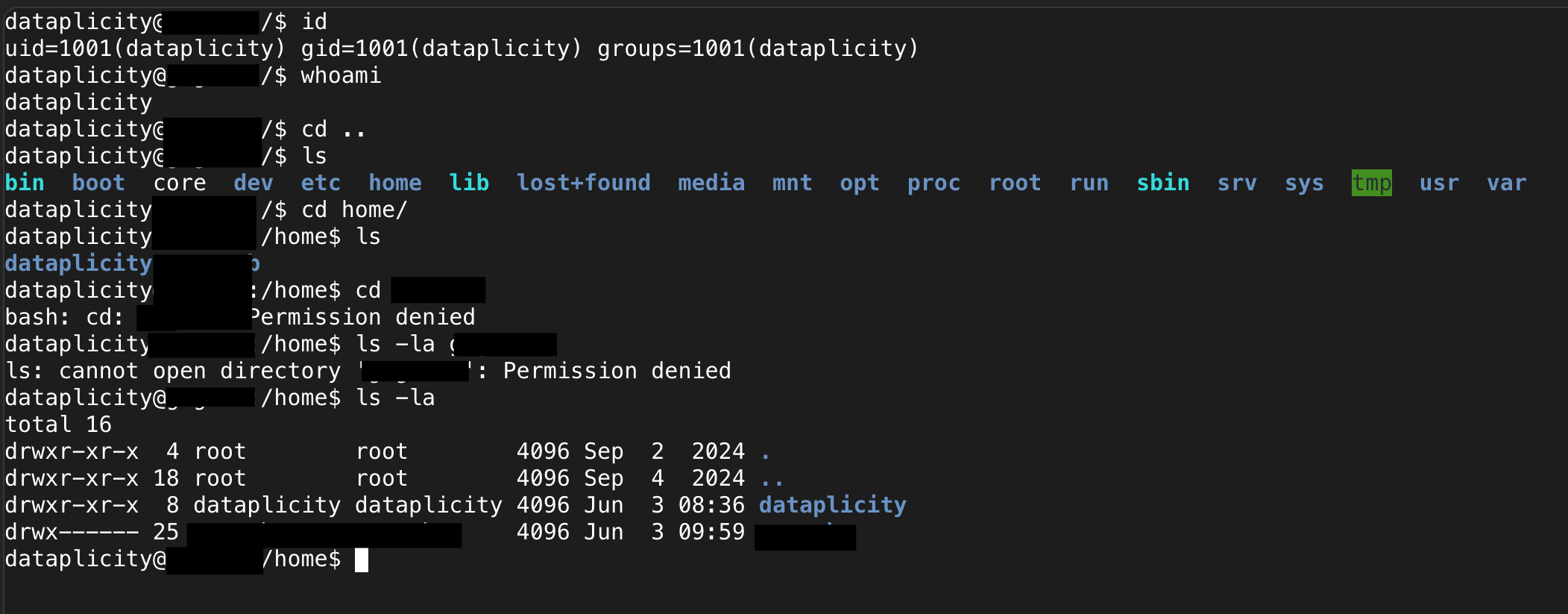
As can be clearly seen in the screenshot above, we did not have permission to access this directory because our session was running as the dataplicity user rather than root or Redacted.
We had been reading about a recently disclosed and highly discussed Linux privilege escalation vulnerability known as "copy.fail". A related vulnerability, known as DirtyFrag, had also attracted significant attention. Unlike classic vulnerabilities such as Dirty COW, which relied on race conditions, these issues stemmed from flaws in Linux kernel subsystems rather than traditional memory corruption bugs.
You can read more about these vulnerabilities here: Copy.fail and DirtyFrag
Since GCC was already installed on the system, I decided to use the DirtyFrag exploit. Initially, however, the exploit failed because none of us realized that the target Raspberry Pi devices were running on an ARM architecture rather than x86.
After quickly searching for an ARM-compatible version of the exploit, we came across an ARM64/AArch64 port of DirtyFrag. The repository was based on the original work by V4bel and had been adapted specifically for ARM-based systems.
With a compatible version of the exploit in hand, we proceeded to test whether the target machines were vulnerable.
And BOOM! We were root.
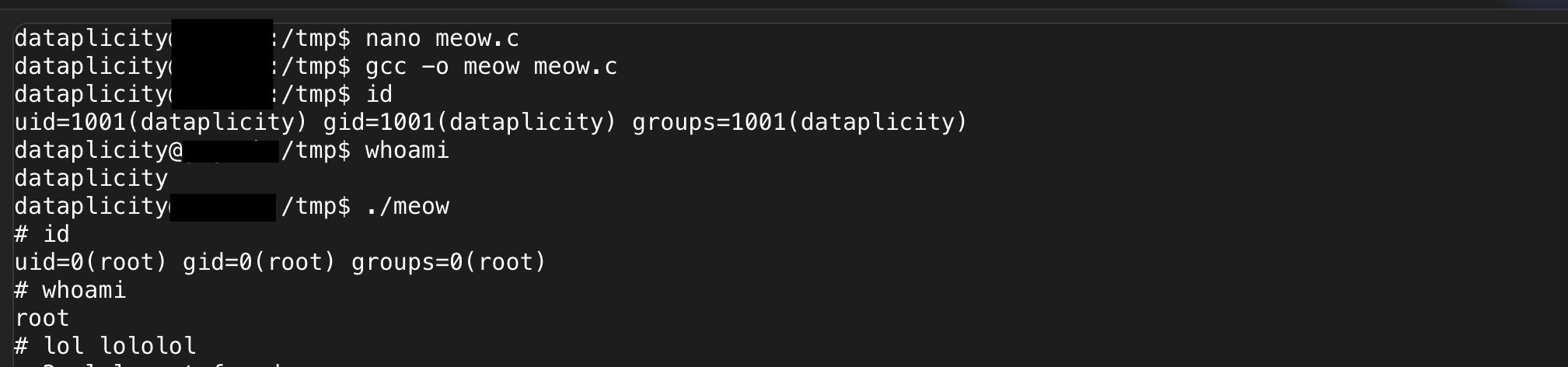
Literally at this point we could do whatever we wanted from the machine: uninstall the running software, change the UPI parameter so that all the transactions go to us instead of the [Redacted] team, or take the machines offline entirely.
The last part
➜  Redacted-machine-build tree
.
|-- backend
|   `-- backend
`-- frontend
    |-- build
    |   |-- Redacted.png
    |   |-- Redacted2.png
    |   |-- asset-manifest.json
    |   |-- assets
    |   |   `-- upi
    |   |       |-- amazonpay.svg
    |   |       |-- googlepay.svg
    |   |       |-- paytm.svg
    |   |       |-- phonepe.svg
    |   |       |-- samsungpay.svg
    |   |       `-- upi-icon.svg
    |   |-- coffeeD.png
    |   |-- default_product_image.png
    |   |-- favicon.ico
    |   |-- index.html
    |   |-- info.png
    |   |-- infoButton.png
    |   |-- logo192.png
    |   |-- logo512.png
    |   |-- manifest.json
    |   |-- payment-failure.gif
    |   |-- payment-failure1.gif
    |   |-- payment-failure11.gif
    |   |-- payment-success.gif
    |   |-- payment-success.jpg
    |   |-- robots.txt
    |   |-- sadkid.gif
    |   |-- serverdown.jpeg
    |   |-- serverdown.png
    |   |-- static
    |   |   |-- css
    |   |   |   |-- 307.2e9dce54.chunk.css
    |   |   |   |-- 348.31d6cfe0.chunk.css
    |   |   |   |-- 354.f66f4b23.chunk.css
    |   |   |   |-- 376.2e288fef.chunk.css
    |   |   |   |-- 408.4ae0fefd.chunk.css
    |   |   |   |-- 473.0e2deebc.chunk.css
    |   |   |   |-- 481.c360b5e2.chunk.css
    |   |   |   |-- 519.7fadf8cd.chunk.css
    |   |   |   |-- 578.76f2db3f.chunk.css
    |   |   |   |-- 660.de896818.chunk.css
    |   |   |   |-- 694.6f33be38.chunk.css
    |   |   |   |-- 801.f82278c8.chunk.css
    |   |   |   |-- 807.1ed4ebb1.chunk.css
    |   |   |   |-- 926.322d6e5b.chunk.css
    |   |   |   `-- main.6da30c0b.css
    |   |   `-- js
    |   |       |-- 145.beebdc5c.chunk.js
    |   |       |-- 206.f8819006.chunk.js
    |   |       |-- 243.a3eca5e0.chunk.js
    |   |       |-- 289.6a2c5b64.chunk.js
    |   |       |-- 307.7a8743ad.chunk.js
    |   |       |-- 348.7ba1226a.chunk.js
    |   |       |-- 354.3dee829c.chunk.js
    |   |       |-- 355.aacb1184.chunk.js
    |   |       |-- 376.1a5073b0.chunk.js
    |   |       |-- 408.c31f6bc1.chunk.js
    |   |       |-- 473.4b1740cf.chunk.js
    |   |       |-- 481.664f4e62.chunk.js
    |   |       |-- 519.1dc50fa0.chunk.js
    |   |       |-- 578.343a0070.chunk.js
    |   |       |-- 660.27e02022.chunk.js
    |   |       |-- 694.1d53c888.chunk.js
    |   |       |-- 779.6c7dcc4e.chunk.js
    |   |       |-- 801.db765cee.chunk.js
    |   |       |-- 807.00da08e1.chunk.js
    |   |       |-- 807.00da08e1.chunk.js.LICENSE.txt
    |   |       |-- 926.20e3edc5.chunk.js
    |   |       |-- main.39daa36b.js
    |   |       `-- main.39daa36b.js.LICENSE.txt
    |   |-- support_qr.png
    |   `-- tom-and-jerry-sad.gif
    |-- start_frontend.sh
    `-- triggerRelay.py
This was the tree view of all the files present in it; the backend was a binary. As I like reverse engineering, I quickly thought of seeing what was inside the binary.
After spending some time I was able to extract the whole backend code.
total 184
drwxr-xr-x   17 0x1622  staff    544 Jun  3 11:51 .
drwxr-xr-x    5 0x1622  staff    160 Jun  3 11:49 ..
-rw-r--r--@   1 0x1622  staff   8196 Jun  3 14:05 .DS_Store
drwxr-xr-x    4 0x1622  staff    128 Jun  3 11:43 controllers
drwxr-xr-x    8 0x1622  staff    256 Jun  3 11:43 imageLoader
drwxr-xr-x   13 0x1622  staff    416 Jun  3 11:43 Interaction
-rw-r--r--    1 0x1622  staff  19963 Jun  3 11:43 machineAgent.js
-rw-r--r--    1 0x1622  staff  35752 Jun  3 11:43 machineAgent.js.jsc
-rw-r--r--    1 0x1622  staff   2169 Jun  3 11:43 machineState.js
-rw-r--r--    1 0x1622  staff   4200 Jun  3 11:43 machineState.js.jsc
drwxr-xr-x    8 0x1622  staff    256 Jun  3 11:43 middlewares
drwxr-xr-x  163 0x1622  staff   5216 Jun  3 11:49 node_modules
-rw-r--r--    1 0x1622  staff   1074 Jun  3 11:43 package.json
drwxr-xr-x    6 0x1622  staff    192 Jun  3 11:43 routes
-rw-r--r--    1 0x1622  staff   3907 Jun  3 13:29 server.js
-rw-r--r--    1 0x1622  staff   4072 Jun  3 11:43 server.js.jsc
drwxr-xr-x    8 0x1622  staff    256 Jun  3 11:43 src
There were around 866 directories and 8026 files in the backend.
At this point, we had obtained both the frontend and backend source code for the entire system. But the satisfaction of hacking the vending machine and getting the items for free was still missing :(
This section is dedicated to Codex, which helped me set up a complete local testing environment. With its assistance, I was able to configure the application, adapt the API endpoints to work locally, and get the entire stack running on my machine.
Basically I was able to run their whole setup locally to test for vulnerabilities.

This is how http://localhost:3000 would look like on the vending machine system.
And this was mine:
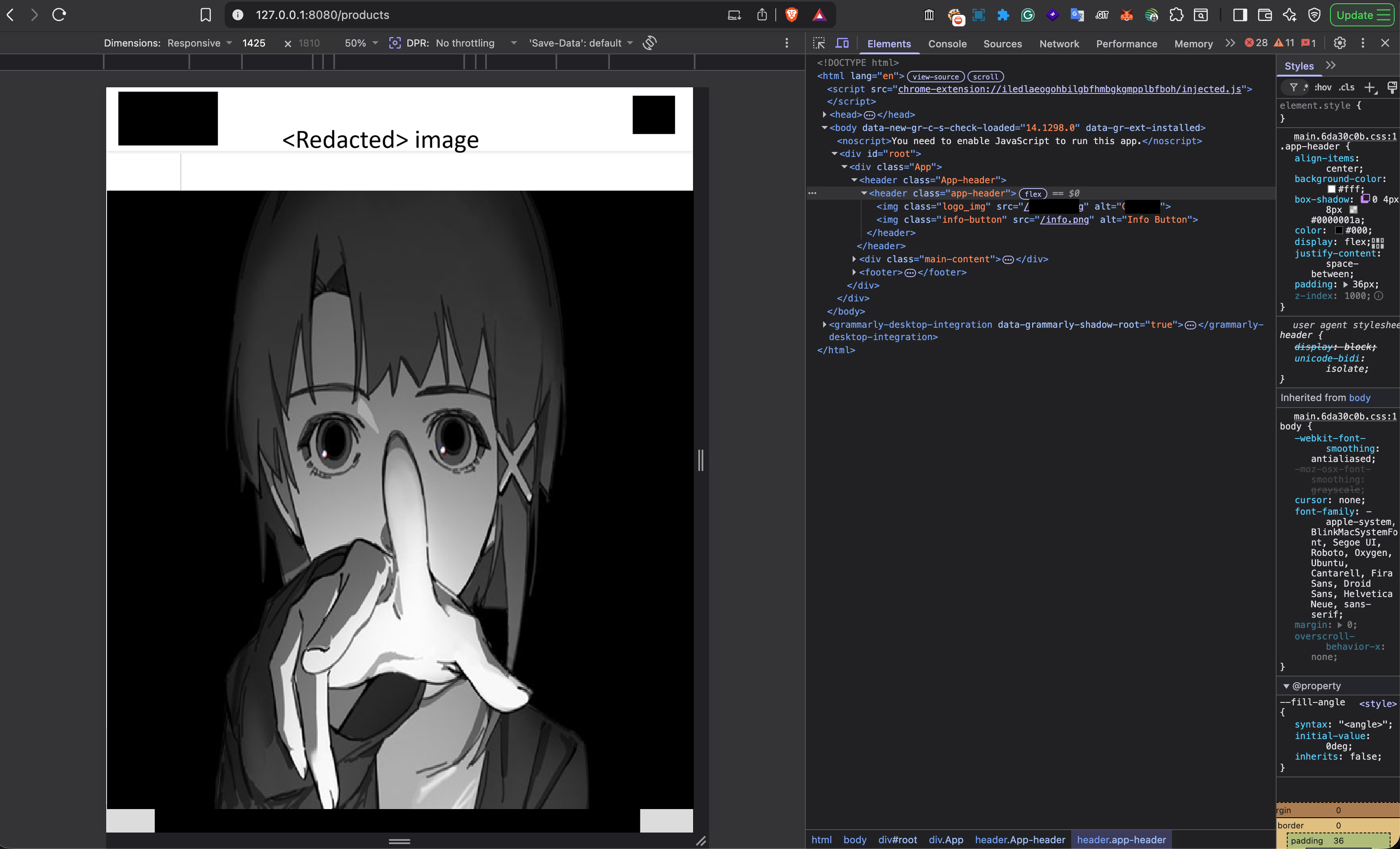
Yes, I know this does not look great, but it was more than sufficient for testing.
NOTE: The vulnerabilities mentioned below are not yet properly tested. These vulnerabilities are working locally on my laptop, but I am pretty sure they would work on the machine as well.
- The first request after selecting an item and checking out is this:
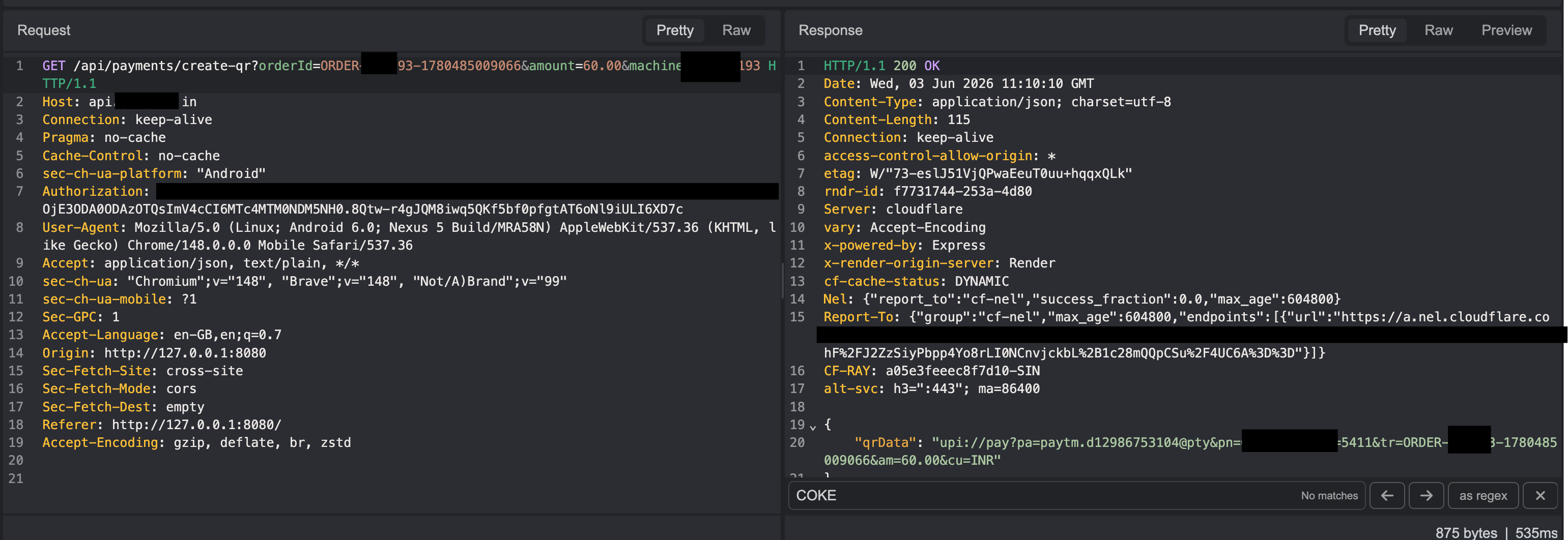
- It basically generates a QR in this type:
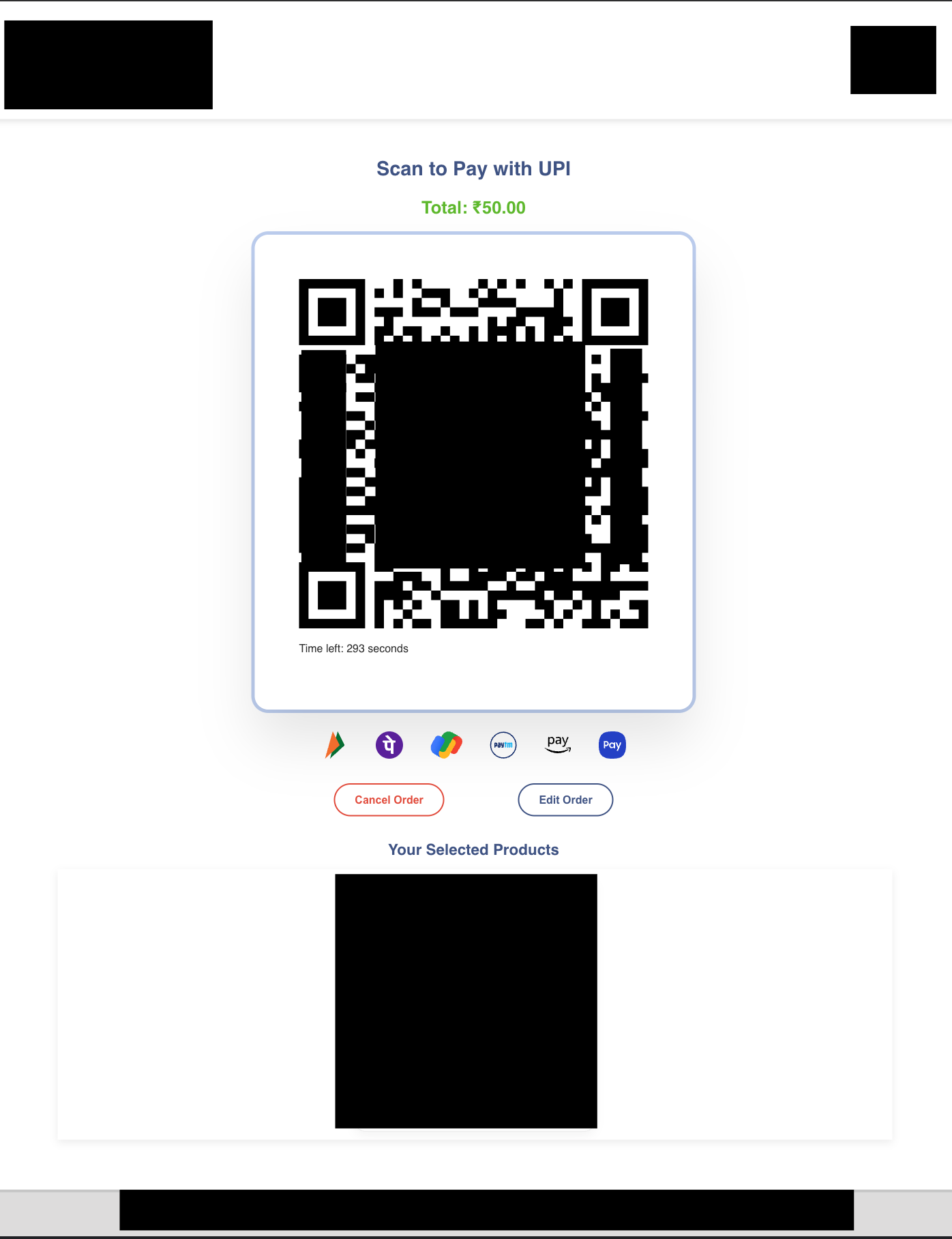
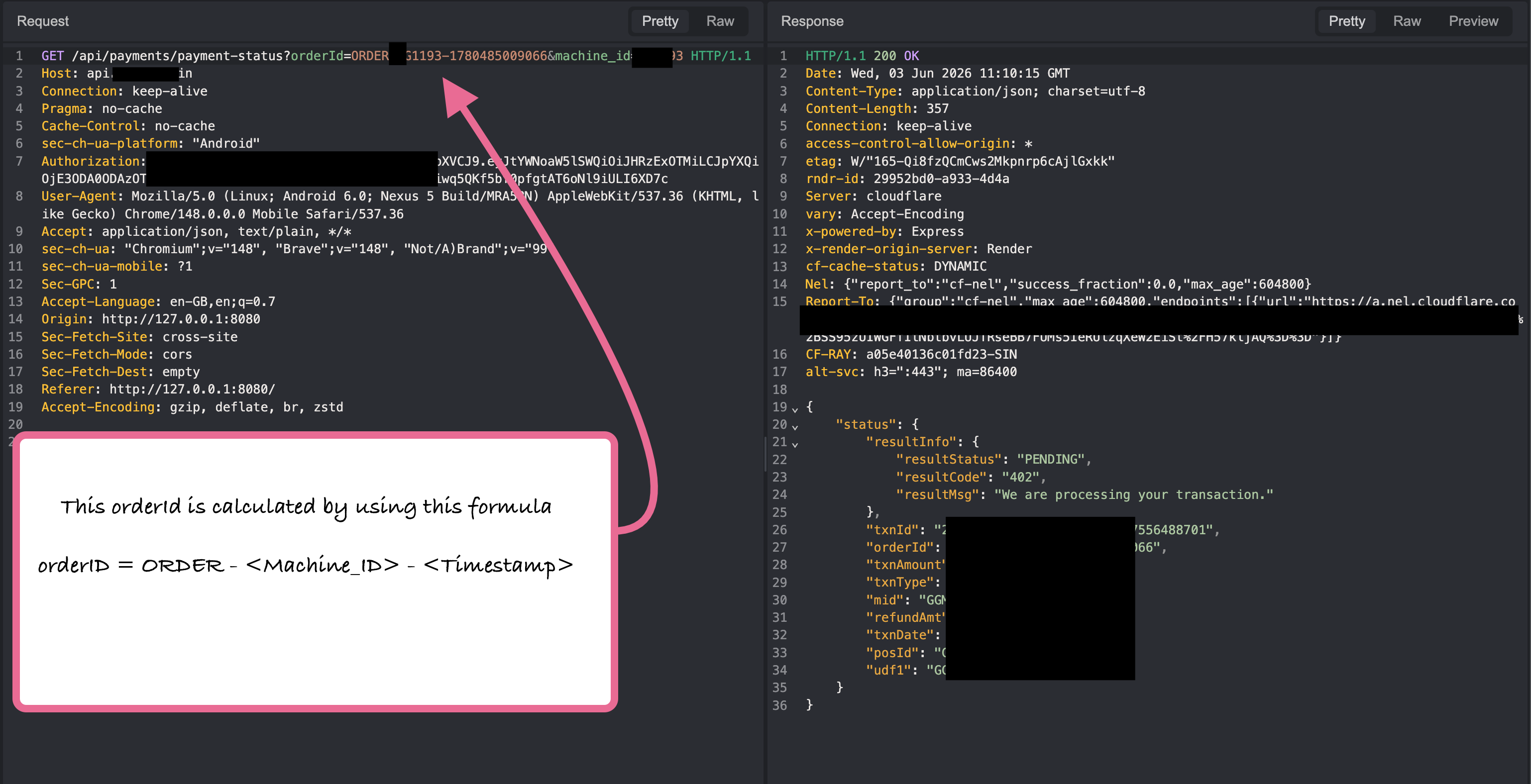
- The next request continuously checks if the user has paid the money or not. On successful payment, the value of
"resultStatus": "PENDING"changes to"resultStatus": "TNX_SUCESS"and"resultcode": "402"changes to"resultcode": "01".
- The next request is only made if the user has paid the money:
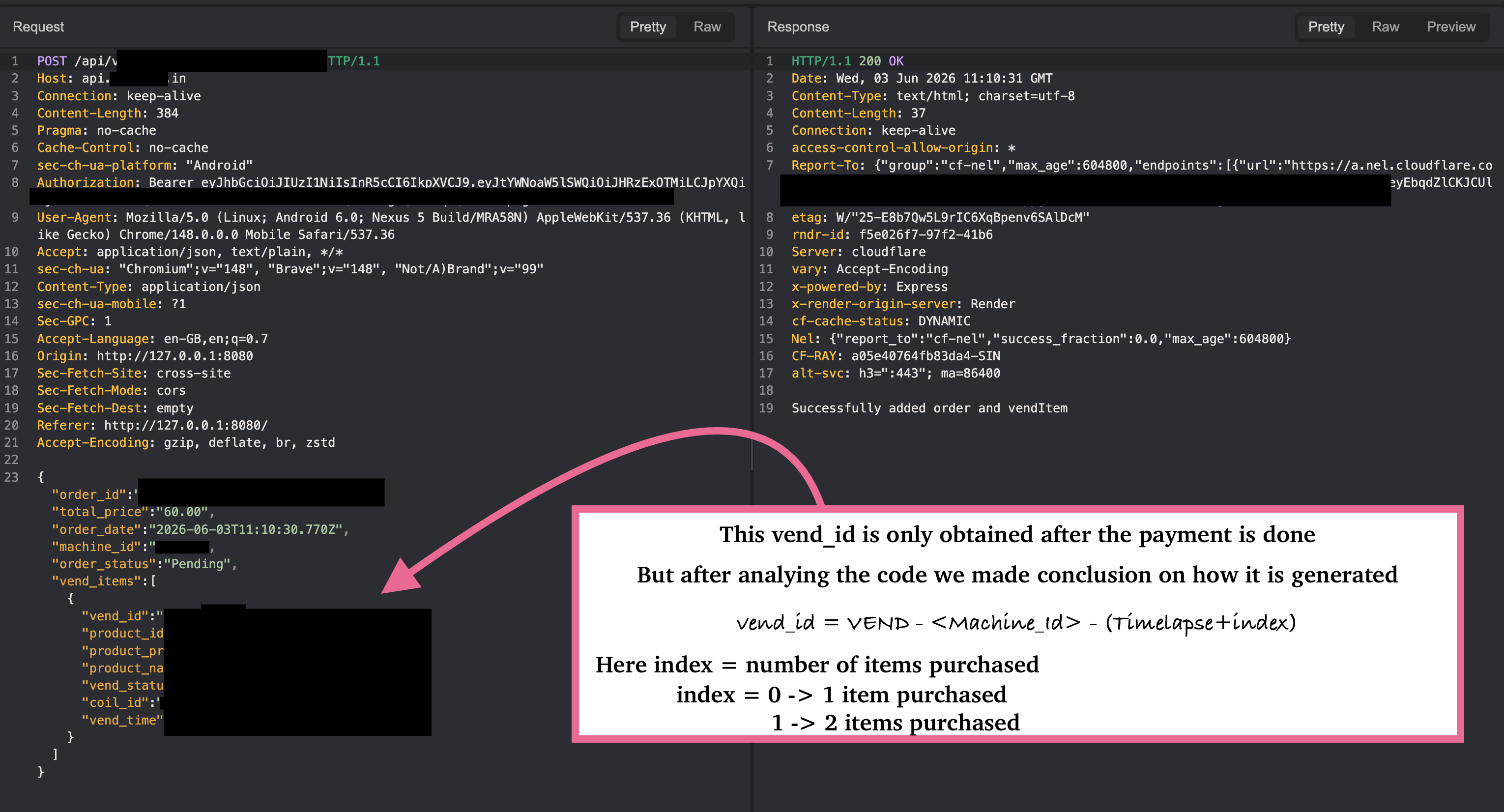
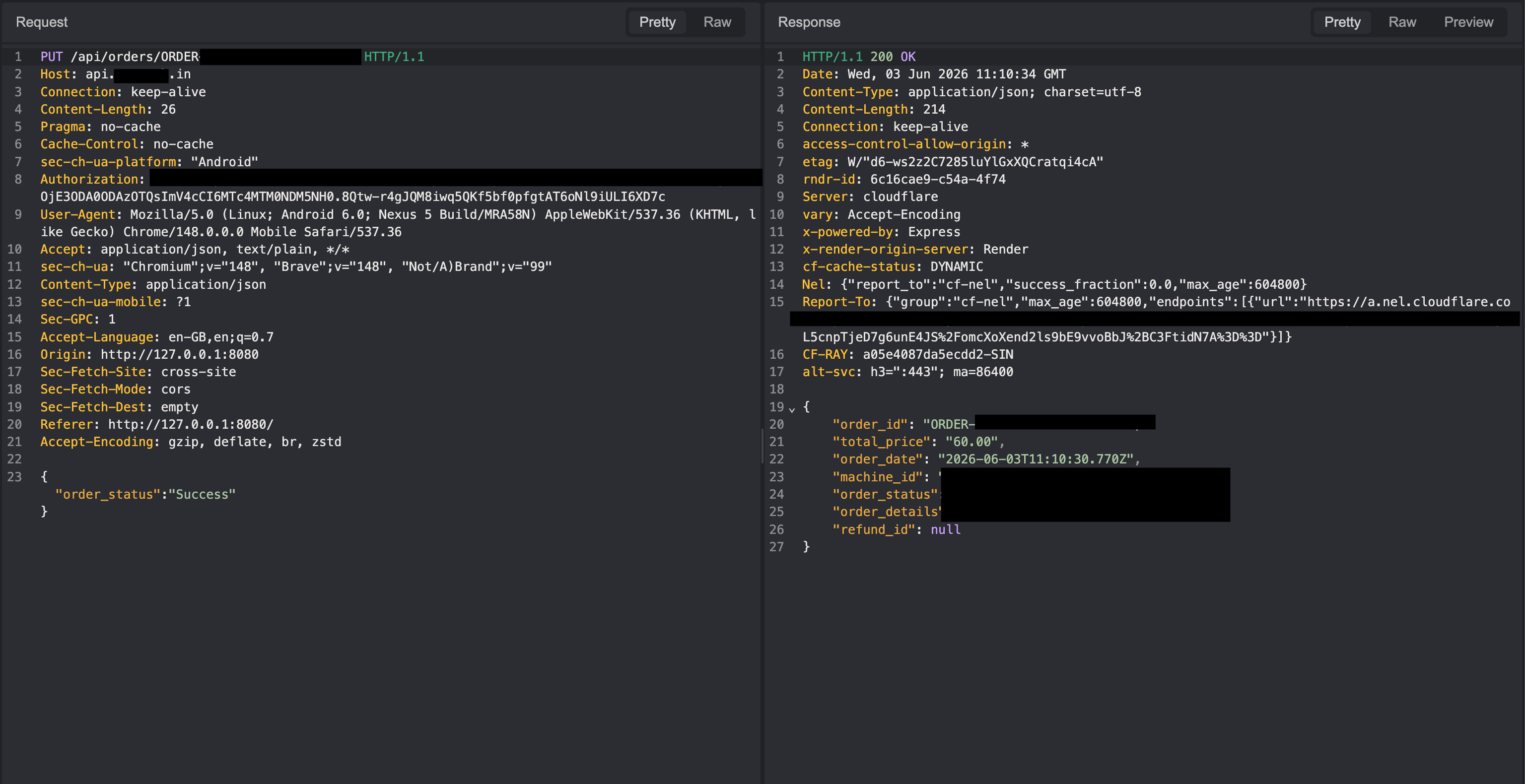
- The next request is pretty straightforward: a
PUTrequest is sent to this endpoint to get the item dispensed.
- This is the last request sent, which again is pretty straightforward and basically updates the machine on the number of items available.
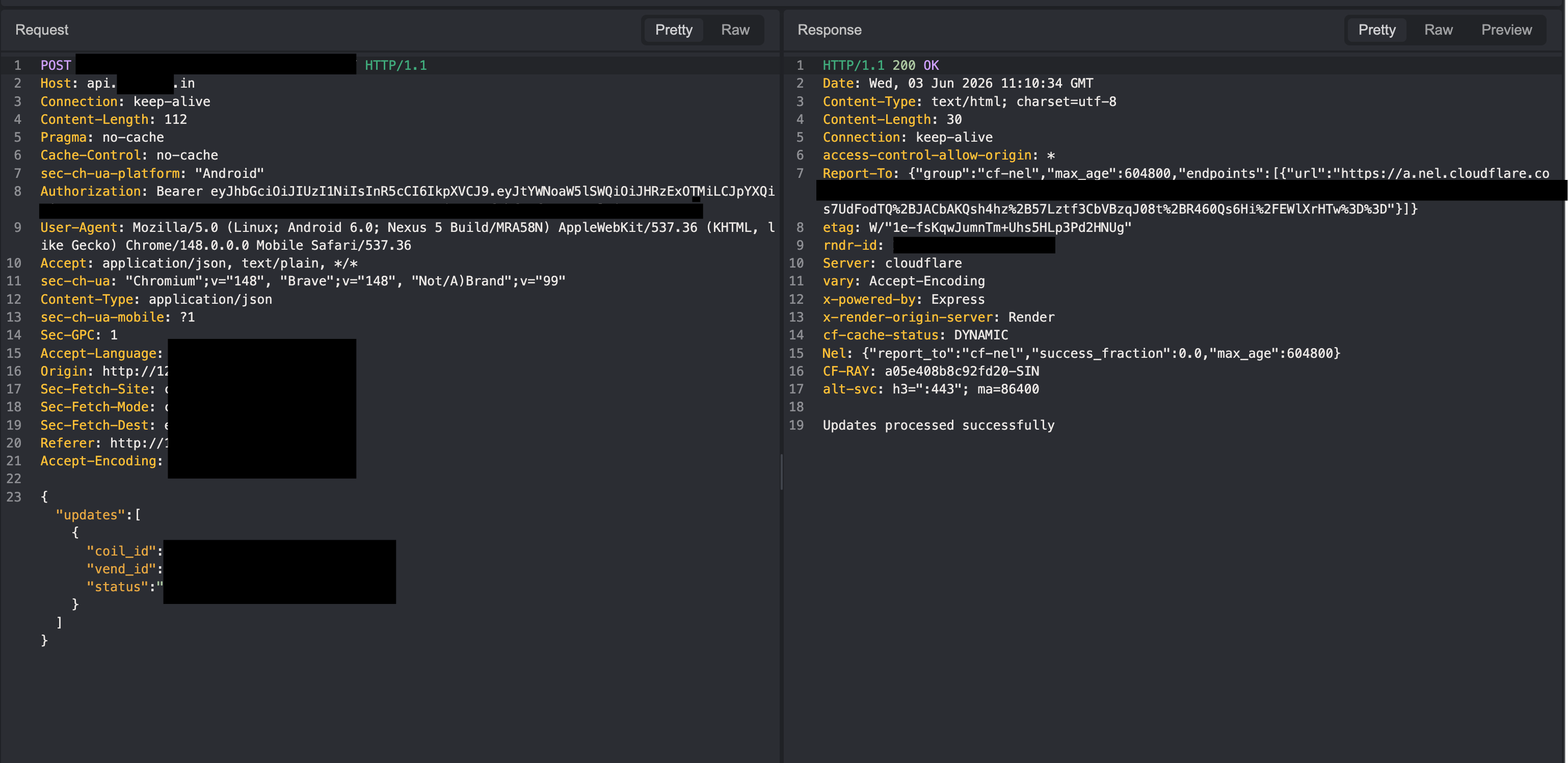
While testing locally, I was able to bypass the payment and eventually get the item for free.
The vulnerability was basically that there were no checks on /v1/checkout/process-order to verify whether the payment was made, which creates a flow that eventually gets us items for free.
Some random stuff we planned but did not do
Our initial idea was to display it across every vending machine managed by the company. However, after discussing the potential impact, we decided against it.

Note: We changed the actual code to create this blog, and most of the redacted images were edited after the blog was completed. The company told us to add AI-generated images instead of the originals to ensure no one can OSINT the target or infrastructure, but we decided not to add any of these images and just blackout the things they wanted us to.